
OpenClaw Setup Guides That Stay Practical
Clawbots is an independent OpenClaw resource hub (formerly focused on Clawdbot) with actionable setup checklists, troubleshooting, and integration paths for real-world use.
Searching for clawbot? Start here: Clawbot to OpenClaw guide.
🚀 Quick Start with OpenClaw
Copy this command into your terminal. It downloads and runs the official OpenClaw installer so you can get a working setup fast.
What this command does: it fetches the installer script and runs it once. Then finish onboarding and send one test message.
Start Setup Guide →
Installation Methods
View all →Official OpenClaw Docs
Visit docs →Getting Started →
Start from scratch with the official baseline flow: install, onboard, and verify your first successful run.
CLI Onboarding Wizard →
Interactive command-line setup to bootstrap OpenClaw with environment checks and sensible defaults.
macOS App Onboarding →
Use the native macOS onboarding flow and connect your local daemon for day-to-day personal assistant usage.
WhatsApp Integration →
Connect OpenClaw to WhatsApp so your assistant is available on mobile from day one.
Telegram Integration →
Set up Telegram channel access for lightweight command-and-control on the go.
Configuration Examples →
Reference configs for common OpenClaw setups, MCP integrations, and channel wiring.
Clawbots Original Guides
See all pages →5-Minute OpenClaw Quickstart Checklist →
A plain-language launch checklist with simple commands and clear pass/fail checkpoints.
WhatsApp and Telegram Channel Setup Plan →
Pick one channel first, test it end-to-end, then expand safely without breaking your base deployment.
10 High-ROI MCP Use Cases to Ship First →
A prioritization framework for integrations that reduce manual work and improve daily assistant usefulness.
OpenClaw Industry Guides
Browse all playbooks →SEO-focused vertical guides targeting searches like “openclaw for real estate” and “clawbot for sales,” with workflows, prompts, and MCP integration ideas.
OpenClaw for Real Estate
Lead routing, showing coordination, client follow-ups, and CRM task automation.Open guide →
OpenClaw for Sales Teams
Pipeline updates, outbound prep, call summaries, and opportunity prioritization.Open guide →
OpenClaw for Customer Support
Faster triage, SLA reminders, escalation routing, and response quality control.Open guide →
OpenClaw for E-commerce
Order issue handling, product ops automation, and repeat purchase workflows.Open guide →
OpenClaw for Recruiting
Candidate coordination, interview scheduling, and pipeline follow-up automations.Open guide →
OpenClaw for Marketing Agencies
Campaign ops, client reporting prep, and task orchestration across channels.Open guide →
OpenClaw for Healthcare Admin
Intake coordination, appointment reminders, and documentation workflow support.Open guide →
OpenClaw for Operations Teams
Recurring process automation, incident checklists, and cross-tool task routing.Open guide →
OpenClaw for Bookkeeping →
Automate reminders, reconciliation tasks, and month-end close workflows for small accounting teams.
OpenClaw for Law Firms →
Intake triage, deadline reminders, and matter communication workflows for lean legal practices.
OpenClaw for Insurance Brokers →
Improve quote follow-up cadence and renewal retention with structured operations playbooks.
OpenClaw for Property Management →
Tenant comms, maintenance triage, and vendor reminders to reduce response delays.
OpenClaw for Restaurants →
Shift checklists, supplier follow-up, and reservation coordination for faster daily operations.
OpenClaw for Home Services →
Lead-to-job automation for plumbers, electricians, HVAC, cleaning, and field teams.
OpenClaw for Freelancers →
Proposal follow-ups, weekly planning, and client updates for solo operators.
OpenClaw for Content Creators →
Idea backlog management, publishing checklists, and sponsor communication workflows.
OpenClaw for Travel Advisors →
Inquiry triage, itinerary follow-up, and pre-trip coordination automation.
MCP Tools & Integrations
OpenClaw uses the Model Context Protocol (MCP) to connect with external services and extend its capabilities.
Calendar & Scheduling
Google Calendar, Apple Calendar, Fantastical integration for smart scheduling.Open guide →
Email Management
Gmail, Outlook, IMAP integration to read, draft, and manage emails.Open guide →
Task Management
Todoist, Things 3, Apple Reminders for task creation and tracking.Open guide →
Notes & Docs
Notion, Obsidian, Apple Notes integration for knowledge management.Open guide →
Smart Home
Philips Hue, HomeKit, Home Assistant control for automation.Open guide →
Media Control
Spotify, Apple Music playback control and recommendations.Open guide →
Fresh Tracking Links
Official OpenClaw Repository →
Track stars, issues, and pull requests to understand project momentum and roadmap signals.
Release Notes Feed →
Check release cadence and read exact changelogs before updating production deployments.
Getting Started Baseline →
Use this as the canonical baseline and apply the Clawbots checklists for faster execution.
Early Clawdbot Deep-Dive (Historical) →
A useful background read for understanding how personal self-hosted agent workflows emerged.
Frequently Asked Questions
What Can OpenClaw Do For You?
Real-world examples of how people use their self-hosted AI assistant every day.
Personal Scheduling
"Schedule a dentist appointment for next Tuesday afternoon" - OpenClaw checks your calendar, finds free slots, and can trigger follow-up actions.
Email Triage
"Summarize my unread emails and draft replies to urgent ones" - let OpenClaw absorb inbox overhead while you focus on decisions.
Smart Home Control
"Turn off all lights and set the thermostat to 68°F" - control supported smart home tools through natural conversation.
Note Taking & Research
"Add this article to my Notion reading list with a summary" - OpenClaw can write to your note system and keep context moving.
Daily Briefings
Set up scheduled jobs to get morning briefings with weather, calendar events, and important reminders delivered automatically.
Media & Entertainment
"Play my focus playlist on Spotify" — Control music playback and get recommendations based on your mood or activity.
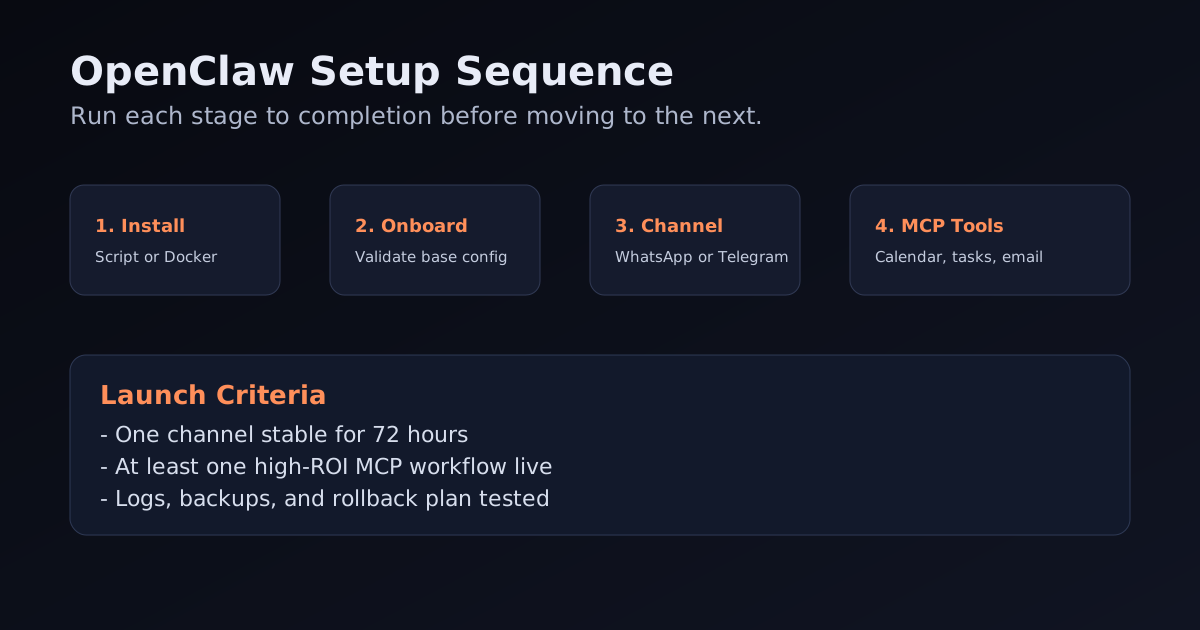
Getting Started in 5 Minutes
Choose Your Installation Method
Start with the official installer script for speed, use Docker for server control, or use the macOS onboarding flow for local daily use.
Configure Your AI Provider
Add your model provider key and validate one successful response path before adding tools or channels.
Connect Your Chat Channel
Link WhatsApp, Telegram, Slack, or Discord so you can message your assistant from anywhere. Most users prefer WhatsApp for mobile access.
Add MCP Tools & Integrations
Enable one high-impact integration first: calendar, task manager, or email. Prove weekly value before expanding scope.
Add Monitoring and Backup
Set health checks, watch logs, and protect your configuration. Reliability is what turns a demo into a daily assistant.
OpenClaw vs Hosted Assistants
| Feature | OpenClaw (Self-Hosted) | Hosted AI Assistants |
|---|---|---|
| Data and infrastructure control | Runs on your own environment | Runs on vendor-managed infrastructure |
| Tooling flexibility | Custom MCP tools and local workflows | Limited to platform connectors and policies |
| Operational overhead | You own updates, monitoring, and backups | Vendor handles operations |
| Time to first result | Longer setup, deeper customization | Faster setup, less customization |
| Best fit | Power users and teams needing control | Users optimizing for simplicity |
Common Setup Issues & Solutions
🔴 "API key not working"
Make sure your Anthropic or OpenAI API key is valid and has credits. Check that you've copied the full key without extra spaces.
🔴 "WhatsApp not connecting"
Scan the QR code quickly, then send a test prompt immediately. If pairing fails, restart the channel service and retry.
🔴 "Docker container keeps restarting"
Check logs with docker logs <openclaw-container>. Most failures come from missing environment variables or incorrect mounted paths.
🔴 "MCP tools not appearing"
Validate each tool config independently, then restart OpenClaw. Confirm required credentials and scopes for each integration.
🔴 "Memory not persisting"
Ensure your data directory is properly mounted (Docker) or has write permissions. Memory is stored locally and needs persistent storage.
🔴 "Slow responses"
Response time depends on your AI provider. Claude is generally faster. Also check your internet connection and server resources.
Why Use Clawbots Alongside Official Docs?
Official docs are the source of truth. Clawbots adds practical sequencing, decision frameworks, and implementation shortcuts so new users can deploy faster and avoid common dead-ends.
- Migration-aware copy: OpenClaw and legacy Clawdbot naming
- Practical checklists with verification points
- Channel rollout strategy to reduce setup risk
- MCP use-case prioritization by ROI
- Curated outbound links kept current to canonical sources
- Independent perspective focused on usability, not hype